Activating or Deactivating Vacation Mode
Important Note: The information on this page is for Hong Kong products only. Models, sequences or settings will vary depending on location and/or where the product had been purchased. To be redirected to your local support page please click here.
Activating or Deactivating Vacation Mode is done differently across several models.
To check whether Vacation Mode is ON or OFF, check if the symbol (Light bulb with a plug) is displayed in the control panel. If it is, Vacation Mode is ON, otherwise it is OFF.
Some models would require you to press and hold a button for a certain period of time until the Vacation Mode symbol appears.
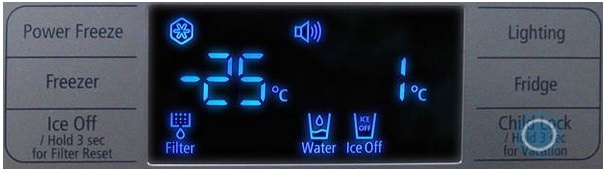
Other models would only require one press of a button.

When this mode is activated, the temperature in the unit’s Refrigerator compartment will be automatically set to 15°C while the freezer runs on its normal state, which in turn saves power while still keeping goods frozen.
If the above information does not match what your product is showing, you may check the User Manual for your product. If you are unable to solve the problem, please contact us for further assistance.
Thank you for your feedback!
Please answer all questions.
RC01_Static Content : This text is only displayed on the editor page