How do I clean the dust bin and grille on my Samsung vacuum cleaner?
Important Note: The information on this page is for Hong Kong products only. Models, sequences or settings will vary depending on location and/or where the product had been purchased. To be redirected to your local support page please click here.
How do I clean the dust bin and grille on my Samsung vacuum cleaner?
1. Empty the dust bin if the dust level reaches MAX or the filter  light is illuminated.
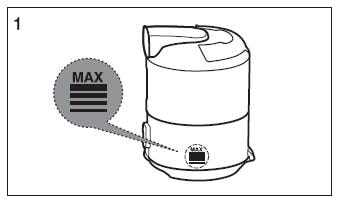
2. Take the dust bin out by lifting the handle.

3. Push the button aside.

4. Turn the grille and take it out.

5. Push the button. Separate the dust bin from the body.
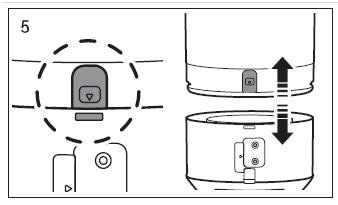
6. Clean the dust bin and body with water.

7. Leave the dust bin and body until it is completely dry.

8. Insert the grille again and turn it clockwise.

If the above information does not match what your product is showing, you may check the User Manual for your product. If you are unable to solve the problem, please contact us for further assistance.
Thank you for your feedback!
Please answer all questions.
RC01_Static Content : This text is only displayed on the editor page