How do I activate the Note9 Dolby Atmos stereo speakers?
Important Note: The information on this page is for Hong Kong products only. Models, sequences or settings will vary depending on location and/or where the product had been purchased. To be redirected to your local support page please click here.
Dolby Atmos provides a high quality 3D surround sound experience without the need of headphones.
Activate Dolby Atmos from Settings
Tap Settings and open Sounds and vibration.
Tap Sound quality and effects.

Slide the Dolby Atmos switch to activate it.

If you wish to change the mode, tap Dolby Atmos and select an audio mode.
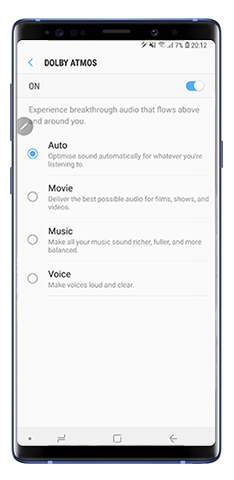
Please note: Some sound effects are not supported when Dolby Atmos is on.
Activate Dolby Atmos from notification panel

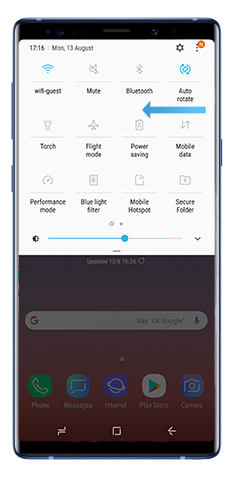
Tap Dolby Atmos.

Please note: Sometimes white noise can be heard loudly when playing captured audio or video files with the Dolby Atmos feature activated. If this occurs, we recommend deactivating this function.
If the above information does not match what your product is showing, you may check the User Manual for your product. If you are unable to solve the problem, please contact us for further assistance.
Thank you for your feedback!
Please answer all questions.
RC01_Static Content : This text is only displayed on the editor page