How do I use Glance feature on Note8?
Important Note: The information on this page is for Hong Kong products only. Models, sequences or settings will vary depending on location and/or where the product had been purchased. To be redirected to your local support page please click here.
Using Glance feature, you can reduce an app to a thumbnail and hover the S Pen over the thumbnail to open the app in full screen view. Glance feature helps you to easily switch between apps.
1-1. While using application, open the Air command panel
Take out S Pen from the slot to open Air Command Panel
1-2. Tap Glance
Alternatively, tap the + icon to add Glance feature
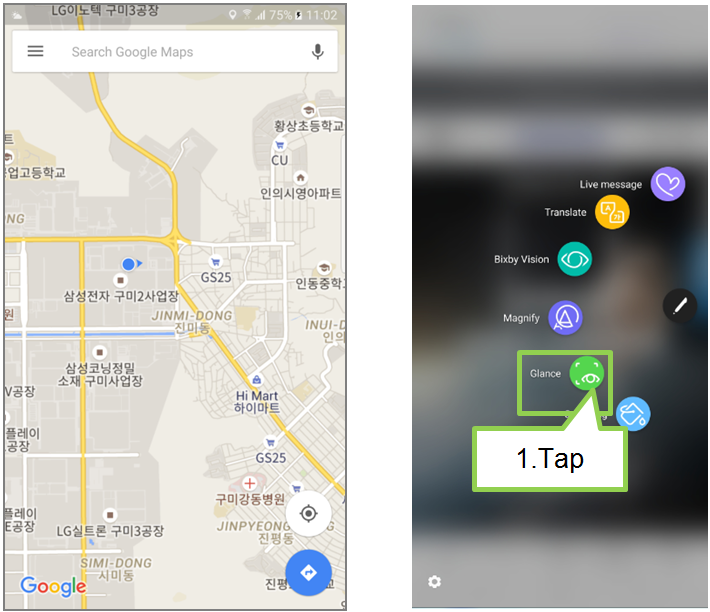
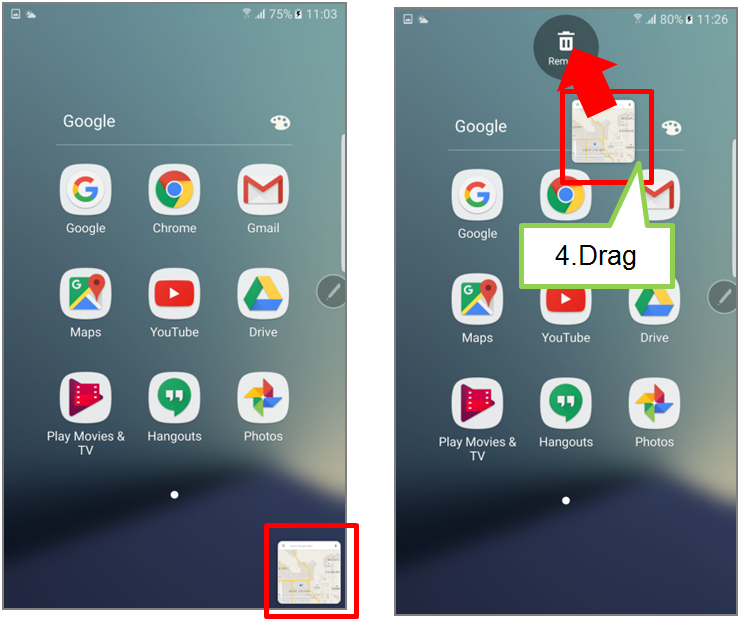
2. The app will be reduced to a thumbnail at the bottom of the screen.
To view the app in full screen view, hover your S Pen over the thumbnail.
3. Hover the S Pen away from the screen to reduce the app to a thumbnail again.
4. To close the minimized app, tap and hold the thumbnail and drag it to Remove at the top of the screen
Screen Images are for reference only. Google+, Google, the Google logo, Google Search, Google Maps, Gmail, YouTube, Android, Google Play and Messenger are the trademarks of Google Inc. All other products and services mentioned may belong to their respective trademark owners.
If the above information does not match what your product is showing, you may check the User Manual for your product. If you are unable to solve the problem, please contact us for further assistance.
Thank you for your feedback!
Please answer all questions.
RC01_Static Content : This text is only displayed on the editor page