Where are Buttons, Ports, Sensors on Galaxy Tab S? What do Buttons do?
Important Note: The information on this page is for Hong Kong products only. Models, sequences or settings will vary depending on location and/or where the product had been purchased. To be redirected to your local support page please click here.
Button functions

The Power button is located on the top edge of your tablet. Press and hold it to turn the device on or off. Press it to wake up the screen or, when the screen is awake, lock the screen. Press and hold it for eight seconds to reset the device should it crash or incur some other major error.

The Recent Apps button is to the left of the Home button. Tap it to open a list of your most recently used apps. Press and hold it to open additional options for what is currently on-screen.

The Home button is located in the centre of the bottom edge of your device. Press it to wake up the screen when the screen has gone dark. When the screen is awake press it to return to the Home screen. Press it twice quickly to launch S Voice. Press and hold it to launch Google.

The Return button is to the right of the Home button. Tap it to return to what was previously on-screen.

The Volume button is next to the Power button. Press the left side of the Volume button to reduce the volume and press the right side to increase it.
Layout
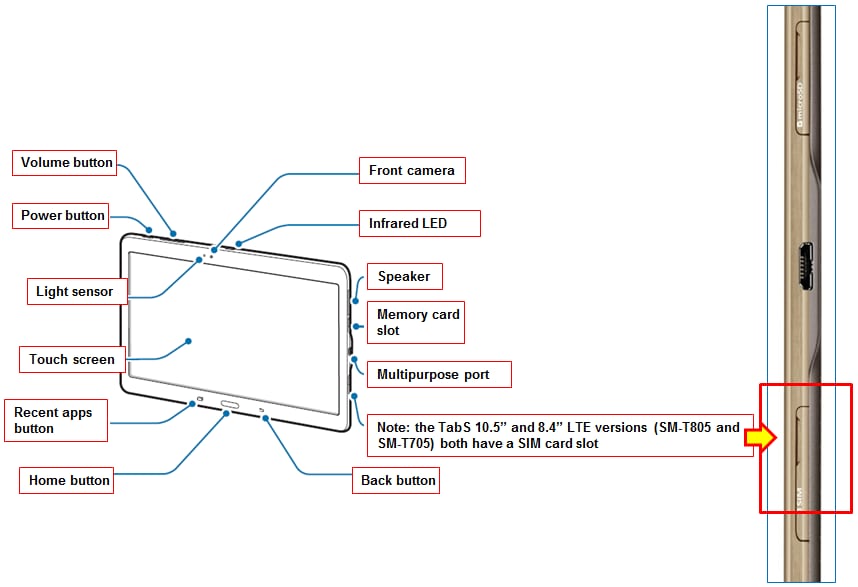

If the above information does not match what your product is showing, you may check the User Manual for your product. If you are unable to solve the problem, please contact us for further assistance.
Thank you for your feedback!
Please answer all questions.
RC01_Static Content : This text is only displayed on the editor page