How do I connect my device to TV using the HDMI Adapter?
Important Note: The information on this page is for Hong Kong products only. Models, sequences or settings will vary depending on location and/or where the product had been purchased. To be redirected to your local support page please click here.
Your mobile device can connect to your HDTV using the Samsung HDMI® Smart Adapter available for purchase separately on the Samsung Accessories page. The adapter provides you with a standard HDMI connection; HDMI cable is not included.
The HDTV Adapter allows you to view videos and other media stored on your phone via a compatible HDTV.
To connect the HDTV Adapter to your device, follow these steps:
1. Connect one end of a universal HDMI cable into the HDTV Adapter.
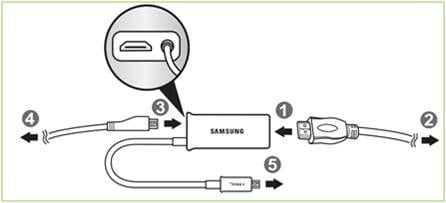
2. Connect the other end to the HDMI port on your TV. If your TV has multiple HDMI ports, you may use any of the ports. Ensure your TV input settings have the right HDMI port selected. See your TV owner's manual to get more information.
Note: Universal HDMI cables are sold separately.
3. Connect your Travel Charger to the HDTV Adapter.
4. Connect your Travel Charger to an approved power source.
5. Connect the HDTV Adapter connector into the Power/Accessory Interface port on your device.
This is the same port you normally use to connect your Travel Charger. The TV screen will instantly display what is on your device Home screen.
Note: Most DRM-protected content cannot be displayed using the HDTV smart adapter.
Please ensure the HDTV is compatible with viewing videos or other media stored on your phone using the HDTV Adapter. Refer to your TV owner's manual for correct HDMI settings.
Your HDTV may not display an image when connecting the HDTV Adapter to a desktop dock.
If the above information does not match what your product is showing, you may check the User Manual for your product. If you are unable to solve the problem, please contact us for further assistance.
Thank you for your feedback!
Please answer all questions.
RC01_Static Content : This text is only displayed on the editor page